Promos
Public promo pages
Using public promo pages to share releases with anyone
Trackdrop lets you reach audiences beyond your contact list using public promo pages.
Public promo pages allow you to generate a shareable link that anyone can open, whether or not they’re already in your contact list.
This article explains how to turn on public access for a promo, what your link recipients will see, and how downloads are handled.
What is a public promo page?
A public promo page is a web page for your promo that is accessible to anyone who has the link.
Visitors will see the same content as recipients you send your promos to via email. They can:
Read the release information and description
Play audio tracks directly in the browser
View any additional files you’ve attached
Download track and other files (with your permission)
Leave feedback (optional, if you request it)
Viewers won’t need to create a Trackdrop account to view or listen to your promo, making it easy for them to check out your new tracks.
Enabling public access
You can enable the public promo page for a release from the Access step of the promo form:
Open the promo you want to share and go to the Access step.
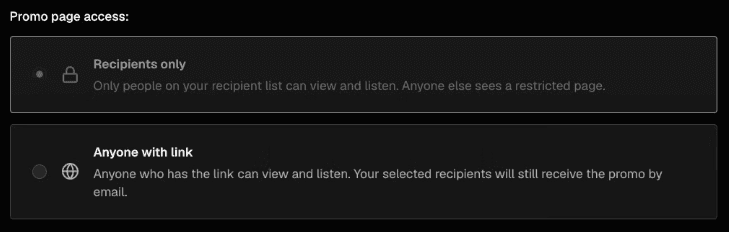
Under Promo page access, you will see two options:
Recipients only -- only people on your recipient list can view the promo.
Anyone with link -- anyone with the link can view the promo.
Select Anyone with link.
Save or continue through the form as normal.
Once enabled, a share link becomes available from the promo detail page.
If you change your mind, you can revoke access later by visiting the Access step of the promo form and changing access to ‘Recipients only’. The link to the public promo page will stop working.
NB: Turning off public access affects the public promo page only. If you’ve also sent the promo directly to your contacts in Trackdrop, they’ll still be able to access the promo via their email invite.
Sharing the public promo page
After enabling public access, go to the promo's detail page in your dashboard. You will see a Share promo button in the top actions area.
Clicking Share promo copies the link to your clipboard. You can paste this link anywhere to share your promo: in an email, a social post, or wherever else you need it.
Can viewers download tracks and files?
Whenever you create a promo on Trackdrop, you can choose to make the files included in your promo available for download.
Downloads are available after the visitor completes a quick email verification step. This keeps your release protected while still allowing anyone with the link to access it, and it gives you a record of who downloaded the material, so your promo stats are updated.
When a visitor clicks a download button:
A prompt asks for their email address.
Trackdrop sends a verification code to that address.
The visitor enters the code to confirm their identity.
The download starts.
This step applies to audio tracks and any other attached files you choose to include, eg. a release statement or cover art. Visitors will only need to verify once per promo page visit.
You can read more about enabling downloads for your promos here.
Can I request feedback from viewers?
Yes! If your promo has Require feedback turned on, visitors will see a feedback section at the bottom of the page, so you can gather their thoughts about your promo.
They will be prompted to leave a rating or comment before or after listening, depending on your settings. This works the same way for public link visitors as it does for direct recipients.
You can read more about requesting feedback for your promos here.